Both rely on the same source of truth: the prices of real sold items on eBay.
AI Pricer
Photograph an item, know instantly what it's worth
Point the camera (or upload a photo) at an item: the AI recognises it, writes a ready-to-publish title, description and category, and estimates the price from real sold items on eBay. One scan costs 10 credits.
How it works, step by step
01
Snap or upload the photo
From the web app or the mobile app. A quick shot at the flea market — with the item still on the stall — works fine.
02
The AI recognises the item
It understands what it is and generates a title, description and category ready to copy. Nothing to type by hand.
03
It computes the market price
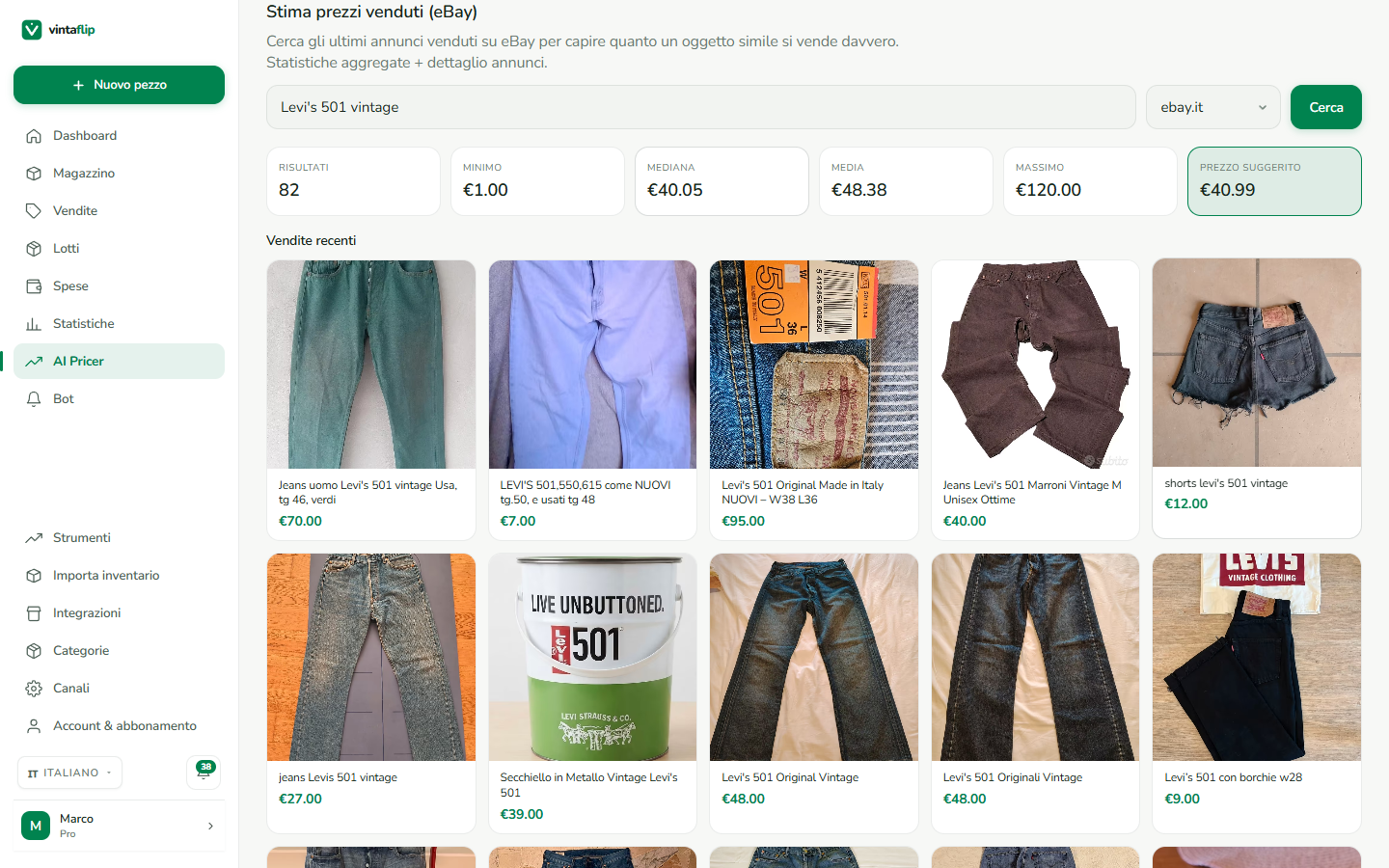
It looks up real sold items on eBay and returns minimum, median and maximum, plus a suggested starting price.
04
Add to inventory
One tap creates the product already filled in with title, description and price. You're ready to list.
Example
The price from real eBay sold items
Aggregated stats — min, median, average, max — and a suggested price, with the latest real listings. The AI Pricer screen in the app.
Good to know
10 credits per scan
You get 1,000 free credits when you sign up. Top up only when you need to, no subscription; the balance never expires.
Honest reliability
If few sold items are found, we tell you: you still see the estimate, but flagged as low-reliability.
No Premium needed
Photo analysis works on any plan, you just need credits. The text search of eBay sold items is Premium+ only.
Shared balance
Credits work across web, iOS and Android. Top-ups are bought from the Android app on Google Play.
Bot
The bot hunts down deals while you do other things
Set up a search and the bot checks the marketplaces at the intervals you choose. It alerts you on every new matching item and — from Premium — flags when it's underpriced versus sold items on eBay.
How to set it up, step by step
01
Give it a name and keywords
The name helps you find it again; the keywords are what it searches for, e.g. "Nike vintage hoodie".
02
Fine-tune the precision
Choose whether all the words must appear or at least a certain number. Add words to exclude, a brand and a min/max price.
03
Pick platforms and pace
Select the marketplaces to monitor and how often to check, from 5 minutes to once a day.
04
Get the matches
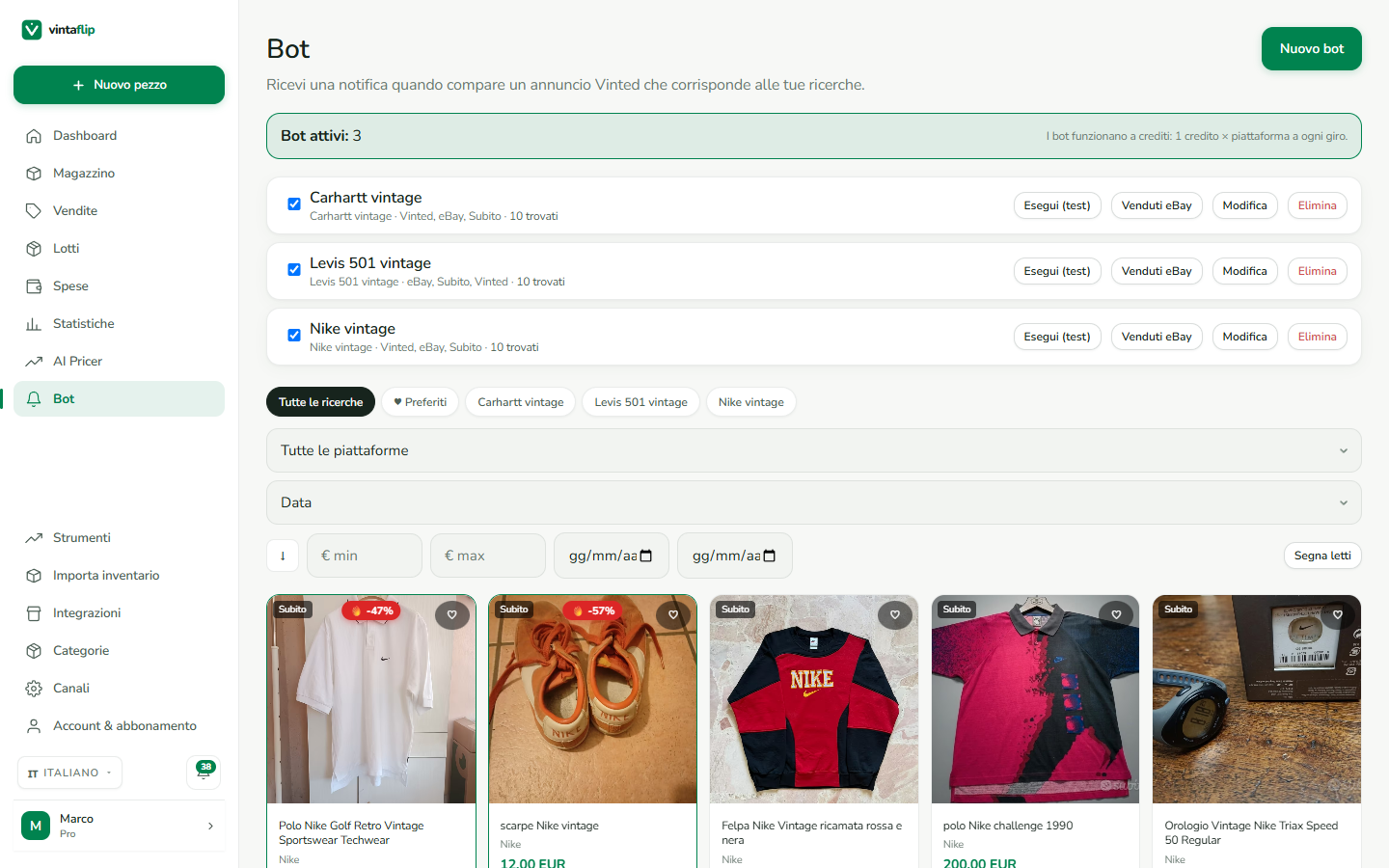
Found items land in a grid feed, with a push notification. You can save them to favourites and check their availability.
05
Turn on deal detection
From Premium: the bot compares the price with the eBay sold median and adds a 🔥 badge when the discount beats the threshold you set.
Monitored platforms
VintedeBaySubitoWallapopFacebook
You can also choose the reference market: Italy, France, Spain, Germany or international (.com).
Example
A feed with a deal highlighted
The Bot screen in the app: matches in a grid, a deal badge and the market reference price.
Good to know
1 credit × platform, per run
No per-bot subscription. A bot on 2 platforms, every hour, costs about 1,440 credits a month.
You set the pace
From 5 minutes to 24 hours. Below 10 minutes we warn you that credit consumption climbs fast.
Deal detection (Premium+)
You set the minimum discount (5–90%) and the bot flags only the real deals, with the eBay reference price.
Under-price alerts
Besides new matches, you can be alerted only when the price drops below a threshold you decide.
Favourites and availability
Save the items you like and, with one tap, check whether they're still available or already sold.
They work together
One source of truth: eBay sold items
The AI Pricer and the bot's deal detection read the same thing — the prices items actually sold for on eBay. So the price you set and the deal the bot flags speak the same language.
✓The AI Pricer uses the median to suggest what to sell for.
✓The bot uses the same median to tell when buying is worth it.
✓No made-up estimates: only real market prices.
Frequently asked questions
How much does an AI Pricer scan cost?
10 credits. You get 1,000 free credits when you sign up and top up only when needed. Credits never expire and the balance works across web, iOS and Android.
Do the bots have a subscription?
No. Bots run on credits: each run uses 1 credit per monitored platform. Paid plans include credits every month.
What is deal detection and who gets it?
It compares a listing's price with the eBay sold median and flags deals below a discount threshold you set. It's included from Premium up.
Which platforms does the bot monitor?
Vinted, eBay, Subito, Wallapop and Facebook Marketplace. You can also choose the reference market (IT, FR, ES, DE or .com).
Do I have to keep the app open?
No. Bots run on our servers at the intervals you choose and send you a push notification when they find something.
Try them free
1,000 AI credits free when you sign up. No credit card.
Vinted® is a registered trademark of Vinted, Ltd. Wallapop® is a registered trademark of Wallapop S.L. eBay® is a registered trademark of eBay, Inc. Shopify® is a registered trademark of Shopify Inc. WooCommerce® is a registered trademark of Automattic Inc. Etsy® is a registered trademark of Etsy, Inc. Vestiaire Collective® is a registered trademark of Vestiaire Collective SA. Facebook Marketplace® is a registered trademark of Meta Platforms, Inc. PrestaShop® is a registered trademark of PrestaShop SA. IberLibro® is a registered trademark of AbeBooks Inc. todocoleccion® is a registered trademark of todocoleccion gestión S.L. StockX® is a registered trademark of StockX LLC.
Vintaflip is not affiliated with, sponsored by, or endorsed by any of the companies mentioned on this website.